Slice Batch Namer Pro for Aseprite
A downloadable game
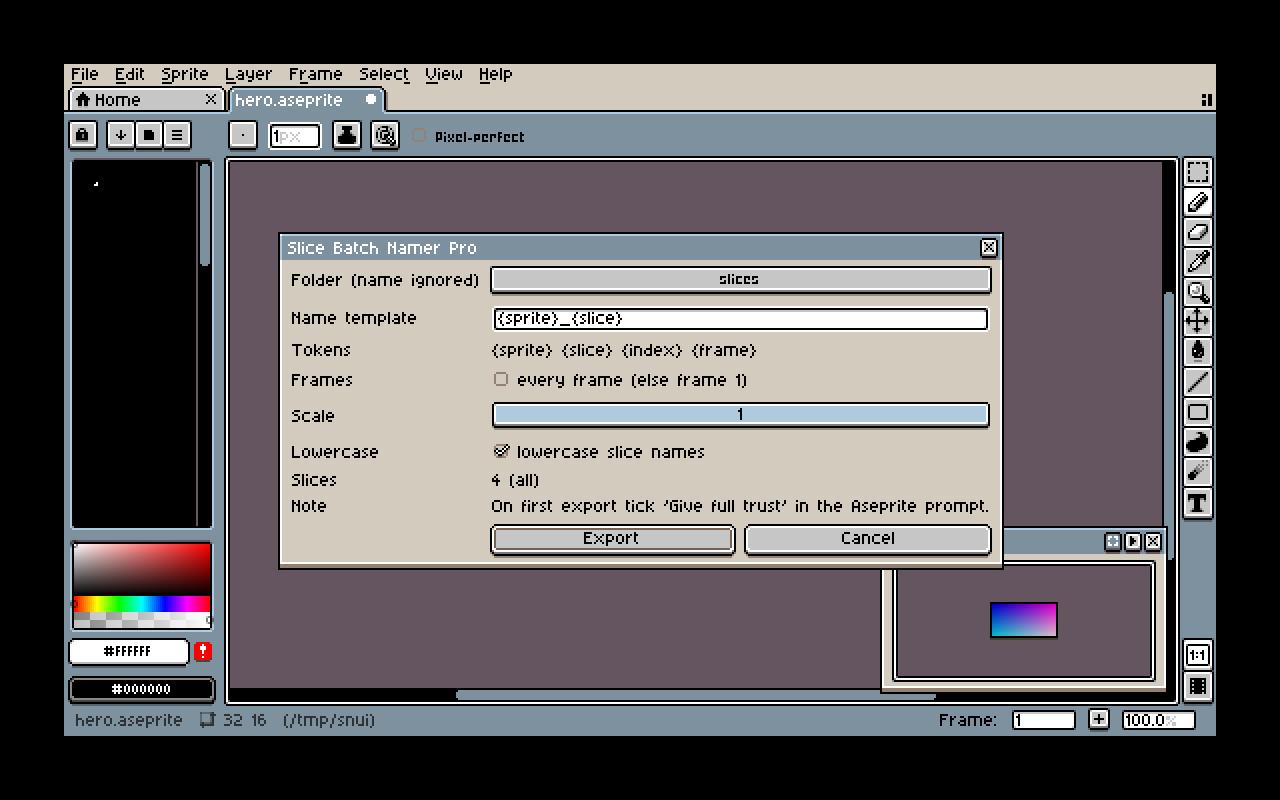
Slice Batch Namer exports every slice of your sprite as its own PNG, named the way you want: File > Export > Slice Batch Namer. No more cropping and renaming slices by hand.
Install: double-click the .aseprite-extension file (or Edit > Preferences > Extensions > Add Extension). Requires Aseprite 1.3 or newer. On the first export Aseprite asks for write permission: tick "Give full trust to this script" and allow write access once.
- One PNG per slice, named {sprite}_{slice}.png: yes
- Slices exported: all
- Name template with {sprite} {slice} {index} {frame}: yes
- Lowercase names: yes
- All frames and 1-8x scaling: yes
Tested in the real Aseprite window (dialog, write-permission prompt, export). Known limits: exports the flattened visible layers; slices are ordered top-to-bottom, left-to-right; per-frame slice keys are not supported (slice bounds are used); Pro scaling and all-frames were verified in an automated run, not by clicking through the window.
Free Lite version to try first: Slice Batch Namer Lite.
Disclosure: this extension was written by an AI agent (Claude) working for the account holder and tested in a real Aseprite.
Purchase
In order to download this game you must purchase it at or above the minimum price of 2.00€ EUR. You will get access to the following files:
Leave a comment
Log in with itch.io to leave a comment.