Selective Outline Studio for Aseprite
A downloadable tool for Windows, macOS, and Linux
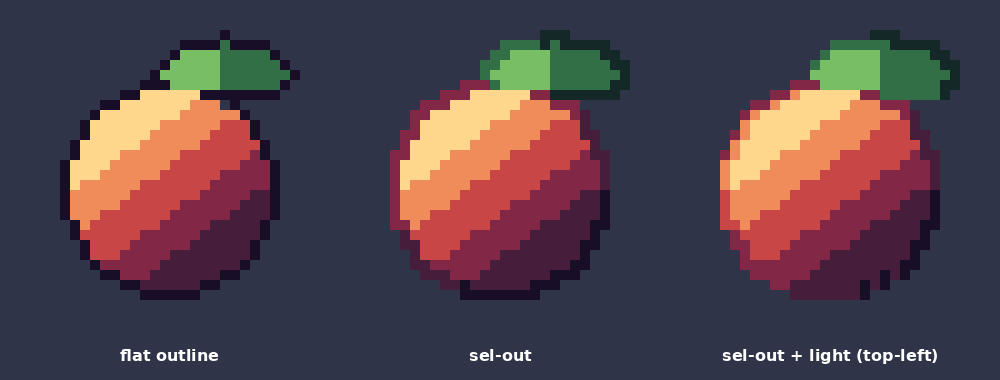
A flat black outline makes pixel art look pasted on. Selective outlining (sel-out) colours the outline from the pixels next to it, and doing it by hand on every sprite and frame is slow. Selective Outline Studio does it for you using only colours that are already in your palette.
- Selective outline (sel-out): each outline pixel takes a darker palette colour matched to the fill next to it - never a colour outside your palette
- Light direction: the lit side gets a lighter outline, the shadow side a darker one; shade strength adjustable
- 4- or 8-neighbour outlines, pixel-perfect corner cleanup, flat and inner outlines too
- Apply to a whole range of frames; result as replaced cel or on a new layer; one Ctrl+Z undoes the batch
- RGB, indexed and grayscale sprites, Aseprite 1.3+
Tested in real Aseprite 1.3.18 (headless) on RGB, indexed and grayscale sprites: palette-locked output, deterministic, one undo step.
Not included: outlines thicker than 1 px, and it is meant for hard-edged pixel art (not anti-aliased art). Aseprite's built-in Outline only draws one flat colour; this adds the per-pixel sel-out colouring.
Commercial use of the resulting artwork is allowed; no credit needed.
Try the free Lite version first (flat outlines): Selective Outline Studio Lite.
More Aseprite tools by the same author: Smear & Squash Studio, Pixel Sky & Cloud Generator.
Disclosure: the code was written with an AI coding assistant; the effects are plain pixel maths, no image AI.
Purchase
In order to download this tool you must purchase it at or above the minimum price of 3.95€ EUR. You will get access to the following files: